Source : Internet
Following this procedure will save you lots of time and prevent video quality degradation if you need video in mp4 format for playback through iTunes, the Apple TV, or on your iOS device.
***We have posted an easier version of this tutorial here, we suggest that most users follow that tutorial instead.***
IDENTIFY THE SOURCE VIDEO AND AUDIO
Before beginning lets get some details on the source video and audio.
Step One
Download and install VideoSpec to your Applications folder from here.
Step Two
Launch VideoSpec from your Applications folder.

Step Three
Click Select from the toolbar.

Step Four
Choose your .mkv file and click Open.

Step Five
Make sure the video format is H.264 and take note of the Frame Rate (fps) and Audio Format.

Important: Make note of the Encoding Profile. Some older Apple devices only support the Main profile so if your video is High Profile this procedure may not work. The new Apple TV supports High Profile at Level 4.0; however, we have tested level 4.1 and it worked fine in all attempts. The iPhone and iPad support High Profile level 4.1.
EXTRACT VIDEO AND AUDIO FROM MKV
Demux (ie extract) the video and audio tracks from the MKV container format.
Step One
Download and install iMKVExtract from here to your applications folder.

Step Two
Launch iMKVExtract and click the Browse button to select your Matroska file.

Step Three
Select your mkv file and click the Choose button.

Step Four
Select the video and audio track for extraction. These are usually track one and track two.

Change the target folder if need be and click the Extract button.
Step Five
iMKVExtract will let you know when the extraction is complete.

CONVERT AUDIO TO AAC
If the audio track you extracted is NOT in AAC format than you will need to convert it. If it is in AAC format then you can skip this section.
Step One
You can use your favorite application to convert the audio or try Audio-Converter which can be downloaded from the Mac App Store here.
Step Two
Launch Audio-Converter from the Applications folder.

Step Three
Set the Convert To: dropdown to AAC then set the destination folder to the folder than contains the files we extracted earlier.

Step Four
Drop the audio file that was extracted from the mkv into Audio-Converter to begin conversion. Note: the audio files will likely be named audio2.ac3 or audio2.dts.

COMBINE VIDEO AND AUDIO INTO MP4 FILE
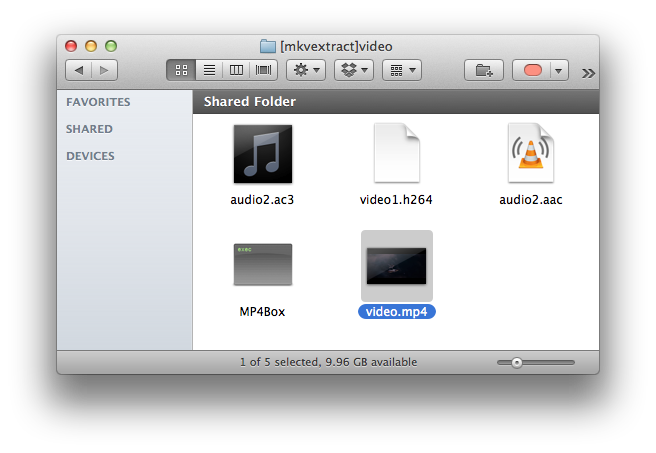
Mux the .h264 video and the .aac audio file into a mp4 file using MP4Box.
Step One
Download MP4Box from here and save it to the same folder as your extracted video and audio. Double click to extract the archive if need be.

Step Two
Open a new Terminal window from Applications:Utilities.

Step Three
Navigate to the folder your video and audio is located in.
ie. cd ~/Desktop/[mkvextract]video

Step Four
Execute the command to create a MP4 video. Make sure to specify the frame rate we noted earlier or your audio will be out of sync. Also be sure to use the .aac audio file and not the original.
ie. ./MP4Box -fps 23.976 -add video1.h264 -add audio2.aac video.mp4

Step Five
MP4Box will now combine the video and audio tracks into a mp4 that can be added to iTunes!


Read More
These are instructions on how to convert H.264 MKV files to MP4 without re-encoding.
Following this procedure will save you lots of time and prevent video quality degradation if you need video in mp4 format for playback through iTunes, the Apple TV, or on your iOS device.
***We have posted an easier version of this tutorial here, we suggest that most users follow that tutorial instead.***
IDENTIFY THE SOURCE VIDEO AND AUDIO
Before beginning lets get some details on the source video and audio.
Step One
Download and install VideoSpec to your Applications folder from here.
Step Two
Launch VideoSpec from your Applications folder.

Step Three
Click Select from the toolbar.

Step Four
Choose your .mkv file and click Open.

Step Five
Make sure the video format is H.264 and take note of the Frame Rate (fps) and Audio Format.
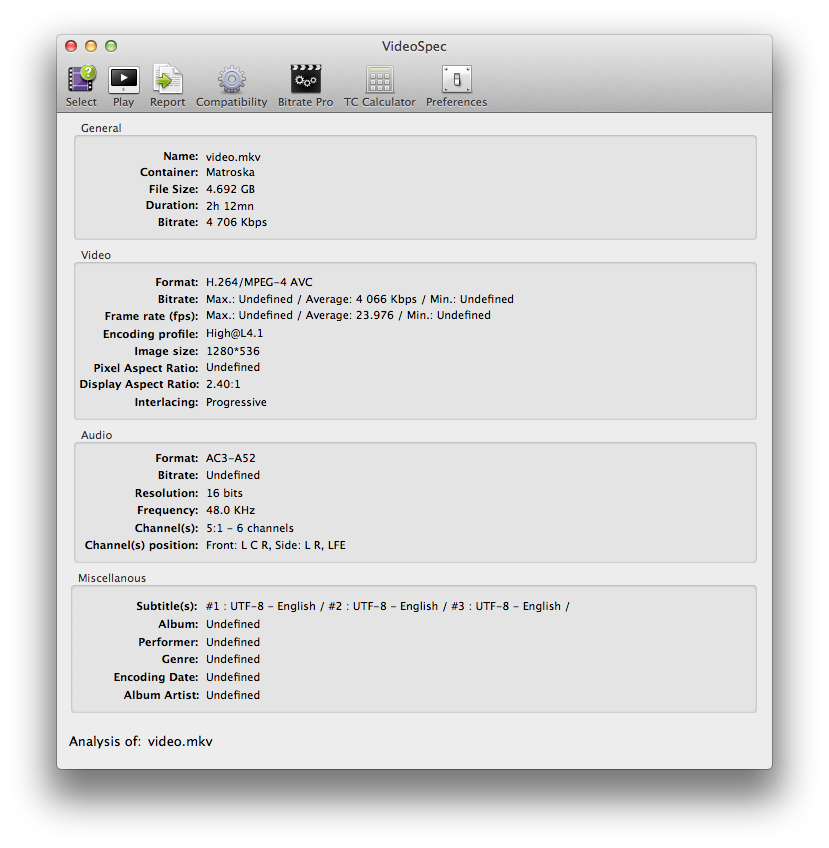
Important: Make note of the Encoding Profile. Some older Apple devices only support the Main profile so if your video is High Profile this procedure may not work. The new Apple TV supports High Profile at Level 4.0; however, we have tested level 4.1 and it worked fine in all attempts. The iPhone and iPad support High Profile level 4.1.
EXTRACT VIDEO AND AUDIO FROM MKV
Demux (ie extract) the video and audio tracks from the MKV container format.
Step One
Download and install iMKVExtract from here to your applications folder.

Step Two
Launch iMKVExtract and click the Browse button to select your Matroska file.

Step Three
Select your mkv file and click the Choose button.

Step Four
Select the video and audio track for extraction. These are usually track one and track two.

Change the target folder if need be and click the Extract button.
Step Five
iMKVExtract will let you know when the extraction is complete.

CONVERT AUDIO TO AAC
If the audio track you extracted is NOT in AAC format than you will need to convert it. If it is in AAC format then you can skip this section.
Step One
You can use your favorite application to convert the audio or try Audio-Converter which can be downloaded from the Mac App Store here.
Step Two
Launch Audio-Converter from the Applications folder.

Step Three
Set the Convert To: dropdown to AAC then set the destination folder to the folder than contains the files we extracted earlier.

Step Four
Drop the audio file that was extracted from the mkv into Audio-Converter to begin conversion. Note: the audio files will likely be named audio2.ac3 or audio2.dts.

COMBINE VIDEO AND AUDIO INTO MP4 FILE
Mux the .h264 video and the .aac audio file into a mp4 file using MP4Box.
Step One
Download MP4Box from here and save it to the same folder as your extracted video and audio. Double click to extract the archive if need be.

Step Two
Open a new Terminal window from Applications:Utilities.

Step Three
Navigate to the folder your video and audio is located in.
ie. cd ~/Desktop/[mkvextract]video

Step Four
Execute the command to create a MP4 video. Make sure to specify the frame rate we noted earlier or your audio will be out of sync. Also be sure to use the .aac audio file and not the original.
ie. ./MP4Box -fps 23.976 -add video1.h264 -add audio2.aac video.mp4

Step Five
MP4Box will now combine the video and audio tracks into a mp4 that can be added to iTunes!